
Discover the best AI tools for work, study, and side hustles. Boost productivity, simplify your workflow, and save hours every day with smart automation.
Why Everyday AI Matters
AI is no longer optional. Whether you’re studying, working remotely, or building a small business, the right tools can multiply what you accomplish in a day. Instead of focusing on specialized enterprise systems, this list highlights tools that help with real, recurring tasks — writing, planning, organization, communication, and personal projects.
The new wave of AI tools focuses on human augmentation rather than replacement. They save time, automate small tasks, and give back mental bandwidth for what actually matters.
| Task Type | Typical Time Saved | Most Used Tool in 2025 |
|---|---|---|
| Writing & Notes | 60–75% | ChatGPT |
| Organization | 40–60% | Notion AI |
| Design & Creativity | 50–70% | Ideogram |
| Productivity & Planning | 45–65% | Motion AI |
| Side Hustles | 70% | Make.com + Perplexity |
The pattern is clear: people use AI less as a replacement, and more as a support system across personal and professional life.
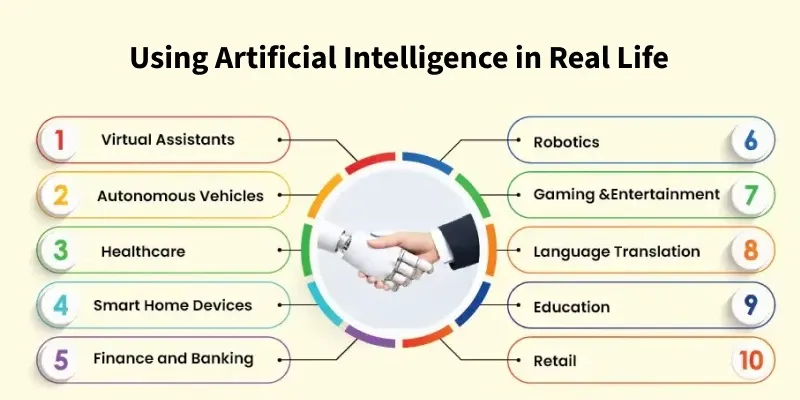
How AI Fits Into Work, Study, and Side Hustles
For Work: Efficiency Without Burnout
At work, the best AI tools act like invisible assistants. ChatGPT helps draft reports, emails, and marketing copy with perfect tone control. Tools like Notion AI and Motion AI handle scheduling, summarizing meetings, and creating to-do lists automatically.
A growing number of professionals use Make.com to connect these apps — turning repetitive admin tasks into fully automated workflows. For instance, when an email arrives, it can trigger an AI summary, store it in Notion, and send a Slack alert — all without manual effort.
This kind of automation saves employees several hours a week while keeping communication clear and structured.
For Study: Smarter Learning and Research
Students benefit the most from AI because of how it simplifies information. Perplexity AI provides accurate, citation-backed answers — making it a safer alternative to search engines. Meanwhile, ChatGPT and Claude 3 summarize complex textbooks, explain concepts in plain English, and even simulate quizzes for revision.
Many students also use Notion AI to organize class notes and convert them into flashcards or summaries. The combination of retrieval and reasoning makes learning far more interactive and less overwhelming.
| Need | AI Solution | Example Use |
|---|---|---|
| Research | Perplexity AI | Summarize academic sources |
| Study Notes | Notion AI | Convert lectures into structured notes |
| Concept Understanding | Claude 3 | Explain complex theories clearly |
These tools turn study time into focused learning — reducing distraction and improving comprehension.
For Side Hustles: From Idea to Income
AI has redefined how people start small businesses or passion projects. A single user can now brainstorm, design, and launch products in days instead of months.
For creators, Ideogram generates ad-ready visuals and branded posts. Freelancers use ChatGPT and Claude to write proposals and client emails that sound professional and persuasive. Meanwhile, Make.com automates content publishing and client updates.
One of the fastest-growing trends is combining AI writing, design, and automation to run micro-businesses — online stores, blogs, or content agencies — with almost no overhead.
Example A — Student Productivity Reimagined
A college student in Toronto tested three tools — ChatGPT, Notion AI, and Perplexity — to manage coursework. Previously, she spent six hours preparing notes and research for each essay. With AI integration, she reduced that time to under two hours.
| Task | Time Before | Time After | Tools Used |
|---|---|---|---|
| Reading & Notes | 4 h | 1 h | ChatGPT + Perplexity |
| Writing Draft | 1.5 h | 30 min | ChatGPT |
| Review & Format | 0.5 h | 15 min | Notion AI |
Her grades remained consistent, but her schedule opened up — allowing her to take on part-time freelance writing work, also powered by AI.
Example B — The Everyday Creator Setup
A designer running a small Etsy shop used Ideogram and Make.com to handle 90% of her creative workflow. She designed product mockups with AI, wrote descriptions using ChatGPT, and connected Make to automate store updates and email responses.
| Workflow Element | Manual | Automated |
|---|---|---|
| Design Creation | 100% | 20% |
| Product Descriptions | 100% | 25% |
| Email Replies | 100% | 10% |
| Marketing Posts | 100% | 30% |
With automation handling the repetitive work, she focused on innovation and branding — doubling her sales in four months.
The Core Tools That Fit Everyday Life
ChatGPT – The universal assistant for writing, communication, and problem-solving.
Claude 3 – Ideal for long reading comprehension and reasoning tasks.
Perplexity AI – Reliable for verified information and quick research.
Notion AI – Keeps life organized with smart notes, summaries, and planning.
Ideogram – Makes professional designs effortless for non-designers.
Make.com – Connects every app, turning daily habits into automated systems.
Motion AI – Perfect for scheduling and balancing workload intelligently.
When combined, these tools cover nearly every aspect of daily digital life: learning, earning, and creating — without overwhelming the user.
Benefits, Limits, and Risks
The benefit of adopting AI in daily life is clear: less time spent on repetitive work and more on creative or personal goals. The limits often come from over-automation — losing touch with the human side of tasks like writing or customer interaction.
| Aspect | Insight |
|---|---|
| Biggest Gain | 3× productivity boost in daily routines |
| Main Constraint | Dependence on online access |
| Risk to Watch | Reduced personal creativity if overused |
Using AI responsibly means treating it as a collaborator, not a replacement. Balance efficiency with originality for long-term growth.
Conclusion
AI is no longer a futuristic tool — it’s a daily partner. The best AI platforms in 2025 are those you can depend on every morning, whether to manage your studies, work, or side projects. They make everyday life smoother, more organized, and more rewarding.
Start small: integrate one or two tools into your daily routine and expand naturally. Once you see how much time you regain, you’ll understand why AI isn’t optional anymore — it’s essential.
Further reading: